The Evolution of Webinar Design: How Canva Templates Are Reshaping Digital Presentations
In the crowded landscape of digital content, standing out during a live or recorded webinar requires more than just compelling talking points. Visual consistency, brand alignment, and audience engagement have become non-negotiable elements of effective online communication. Enter the Webinar Canva Template—a pre-designed, customizable framework that enables professionals to produce polished, on-brand webinar slides without the need for advanced graphic design skills. This tool sits at the intersection of accessibility and professional-grade creativity, offering a practical solution for entrepreneurs, marketers, freelancers, and corporate teams alike.
Understanding the Webinar Canva Template
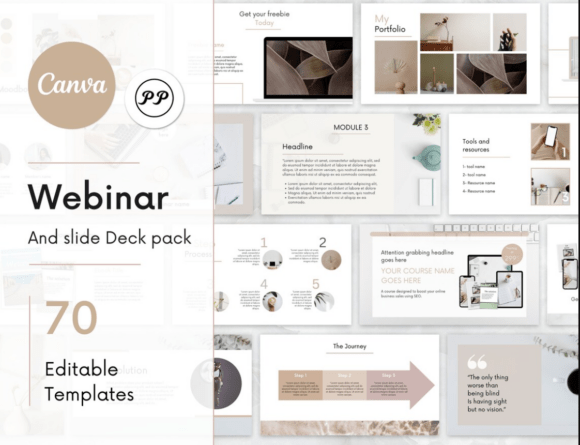
A Webinar Canva Template is a structured slide deck built within Canva, the cloud-based design platform, specifically optimized for webinar presentations. These templates typically include title slides, agenda overviews, speaker introduction pages, content slides, data visualization layouts, audience interaction prompts, and closing calls to action. What distinguishes them from generic presentation templates is their intentional design for the webinar format: they account for screen sharing constraints, camera overlay placements, chat box integration, and pacing for live delivery.
These templates are not static one-off designs; they are modular systems. Users can swap colors, fonts, images, and icons to match their brand guidelines, while maintaining a cohesive visual narrative throughout the presentation. This adaptability makes them relevant across industries—from corporate training and product launches to educational workshops and creative portfolio reviews.
Broader Market and Industry Context
The rise of the Webinar Canva Template mirrors larger shifts in the professional landscape. Remote and hybrid work models have normalized virtual events, and audiences now expect a baseline level of visual quality that rivals in-person presentations. At the same time, the democratization of design tools has lowered the barrier to entry for non-designers. Canva itself has grown from a niche graphic tool into a ecosystem used by over 100 million monthly active users, signaling that the demand for simple, powerful design solutions is not a passing trend but a structural change in how professionals create content.
In the broader creative and business technology context, templates represent a move toward efficiency without compromising on quality. Small businesses and solopreneurs, who may lack dedicated design teams, can now produce slides that look as polished as those from enterprise marketing departments. This levels the playing field, allowing substance and message to take center stage rather than production limitations.
The consumer trend here is clear: audiences are visually literate and have little tolerance for poorly designed presentations. They expect seamless transitions, readable typography, and thoughtful use of whitespace. A well-designed Webinar Canva Template addresses these expectations head-on, reducing cognitive load and helping viewers focus on the content rather than the clunkiness of the slides.
Why People Are Paying Attention
Several converging factors explain the growing attention around the Webinar Canva Template. First, time scarcity is a universal challenge for professionals. Designing a webinar deck from scratch can take hours or even days, especially when iterating through multiple versions. Templates collapse that timeline dramatically, enabling users to have a draft-ready presentation in minutes. For freelancers and entrepreneurs juggling multiple roles, this efficiency is not a luxury—it is a necessity.
Second, the psychology of consistency plays a role. Repeated exposure to consistent visual branding builds trust and recognition. Templates enforce this consistency by default, ensuring that every slide aligns with the same design system. For marketers running recurring webinar series, this reinforces brand recall session after session.
Third, the collaborative nature of Canva allows teams to co-edit templates in real time. A marketing lead can adjust the messaging while a designer fine-tunes visuals, all within the same file. This workflow fluidity is particularly valuable for agency teams and in-house marketing departments where speed and alignment are critical.
Changing Needs, Preferences, and Workflows
The relevance of the Webinar Canva Template is rooted in evolving professional expectations. One of the most notable shifts is the move from static, linear presentations to dynamic, interactive experiences. Modern webinar audiences expect polls, Q&A segments, and live demonstrations. Templates now include placeholders for these interactive elements, integrating them naturally into the slide flow rather than treating them as afterthoughts.
Another changing preference is the demand for mobile-friendly content. Many attendees join webinars from smartphones or tablets. Templates designed with mobile responsiveness in mind ensure that text remains legible and visuals are scalable, regardless of device. This consideration was rare in older presentation formats but is now standard in forward-thinking template designs.
Workflow changes are also notable. The traditional model of creating slides in PowerPoint or Keynote and then manually exporting them for sharing is giving way to a more integrated approach. Canva templates allow direct sharing via links, embedding in websites, and even live presentation within the platform. This reduces friction and makes it easier for hosts to distribute materials post-webinar without additional formatting work.
For freelancers and consultants, the ability to quickly customize a template for each client engagement is a significant advantage. Instead of rebuilding a deck from scratch for every new project, they can maintain a library of templates and adapt them per client. This speeds up proposal creation, client onboarding, and educational sessions.
Practical Examples and Observations
Consider a marketing consultant preparing a webinar on social media strategy. Using a Webinar Canva Template, they can select a color palette that matches their personal brand, upload their logo, and populate predefined sections for audience analysis, platform comparisons, case studies, and actionable takeaways. The template's built-in chart tools allow them to visualize engagement metrics without needing to jump to a separate tool. The result is a professional, cohesive presentation that feels custom-designed even though it started from a template.
For a corporate training team, a template might include slides for learning objectives, module breakdowns, quiz prompts, and summary takeaways. The team can duplicate the template for each training session, updating only the specific content while maintaining the same look and feel. Over time, this creates a recognizable training brand that employees associate with consistent quality and structure.
Observations from frequent webinar hosts reveal that the audience's perception of credibility often correlates with the visual polish of slides. Even when the content is strong, poorly designed slides can undermine authority. Templates mitigate this risk by providing a professional baseline that users can enhance over time as they become more comfortable with design principles.
Another practical observation is the role of accessibility. Many Canva templates now include considerations for color contrast for low-vision viewers, readable font sizes, and logical reading order for screen readers. This is not just a compliance requirement but a best practice that broadens audience reach and demonstrates inclusivity.
Connecting to Larger Developments
The Webinar Canva Template is part of a broader movement toward content modularity and asset-based marketing. Organizations are shifting from creating one-off presentations to building component libraries—individual slides, graphics, and text blocks that can be assembled in different combinations for different contexts. Templates serve as the scaffolding for this modular approach, enabling teams to be more agile in their content production.
This trend aligns with the growth of no-code and low-code tools that empower non-technical professionals to accomplish tasks that previously required specialized skills. Just as platforms like Webflow allow non-developers to build websites and Zapier enables workflow automation without programming, Canva templates allow non-designers to create professional visuals. This democratization is reshaping the creative economy, reducing bottlenecks, and speeding up go-to-market timelines for products and services.
From a lifestyle perspective, the adoption of templates reflects a broader cultural preference for curated simplicity. Professionals are inundated with information and tools; anything that reduces decision fatigue and accelerates output is welcome. Templates provide a framework that limits choices to a curated set of options, helping users avoid the paradox of choice while still retaining creative control.
Looking at the technology landscape, the integration of AI into design tools is the next logical evolution. Canva has already introduced AI-powered features like magic resize, background removal, and text-to-image generation. As these capabilities mature, the Webinar Canva Template will likely become even smarter—offering suggestions for slide layouts based on content, automatically aligning color schemes with brand guidelines, and even generating talking points or presenter notes. This future is not speculative; it is already emerging in beta features. Professionals who adopt templates today are building fluency with a workflow that will only become more intuitive and powerful over time.
Practical Recommendations for Professionals
For those looking to integrate a Webinar Canva Template into their workflow, start by identifying the recurring types of webinars you produce. A single template can be adapted for different topics, but having two or three variations—for example, one for educational sessions, one for product demos, and one for client pitches—covers most scenarios. Customize each template with your brand colors, fonts, and logo, then save them as preset templates within Canva for quick access.
Pay attention to slide pacing. A good template balances text density with visual breaks, using images, icons, or white space to give the audience moments to process information. If you notice engagement dropping during certain parts of your webinar, review whether those slides are visually cluttered or lack clear focal points. Templates can be adjusted iteratively based on real audience feedback.
Consider also the post-webinar life of your content. A Webinar Canva Template can be repurposed into a shareable PDF, social media carousel, or blog post graphic. Designing with repurposing in mind from the start extends the return on your design investment and ensures brand consistency across channels.
For teams, establish a shared template library within Canva's Brand Kit. This ensures that all members have access to the same approved templates, fonts, and colors, reducing the risk of brand drift. Regular reviews of template performance—which slides are most effective, which are skipped—can inform updates that keep the templates aligned with audience expectations.
Conclusion
The Webinar Canva Template is more than a shortcut to better-looking slides; it is a strategic tool that reflects and responds to the changing dynamics of professional communication. As audiences become more discerning, workflows more demanding, and technology more integrated, templates offer a pragmatic path to consistent, high-quality visual content. They empower professionals across sectors to focus on what truly matters—the message, the connection, and the value delivered during each webinar. Whether you are a solopreneur hosting your first live session or a marketing team scaling a series of events, adopting a template-based approach positions you to meet the moment with confidence and clarity.